Model Group is an international manufacturer of corrugated packaging with production plants in Switzerland, Germany, the Czech Republic, Poland and Croatia. The group employs more than 4,600 people across 15 plants throughout Europe.
The Czech subsidiary Model Obaly, a.s. operates five plants with approximately 1,340 employees. Three-shift industrial production where a system outage is not an IT problem — it is a production problem.
Infrastructure does not grow according to plan. It grows according to need. Every year a new server, a new application, a new site is added. And each one gets its own tool, its own process, its own team.
Model Group ended up exactly here: Windows servers managed one way, Linux servers another, Azure VMs a third. No common view. No unified security policy. And with a concrete threat on the horizon — the approaching end of extended support for critical systems that could not be migrated overnight.
The most painful question was not technical. It was operational: how many servers have up-to-date patches right now? Nobody could answer with certainty.
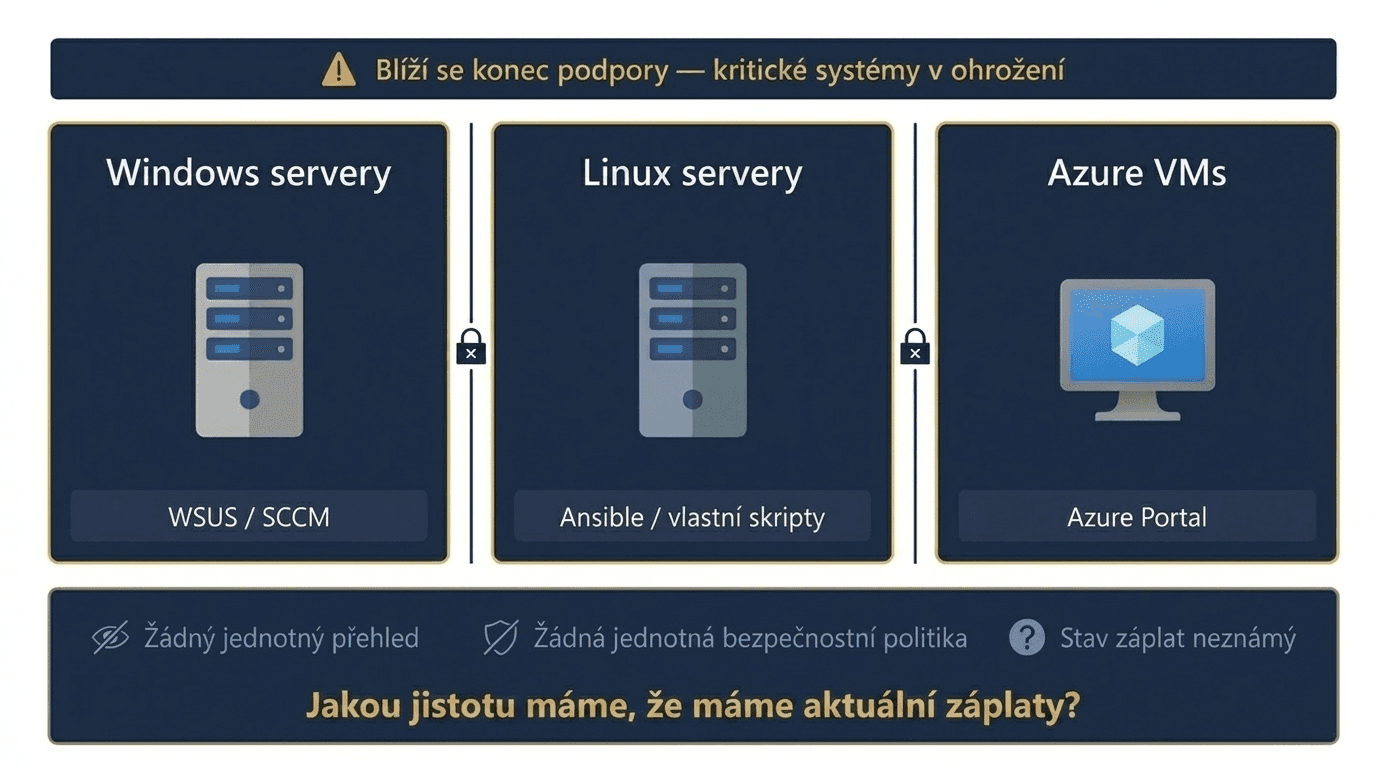
Roztříštěný tooling, tři sady nástrojů a žádný jednotný přehled. Tady jsou 3 kroky, kterými jsme to změnili:
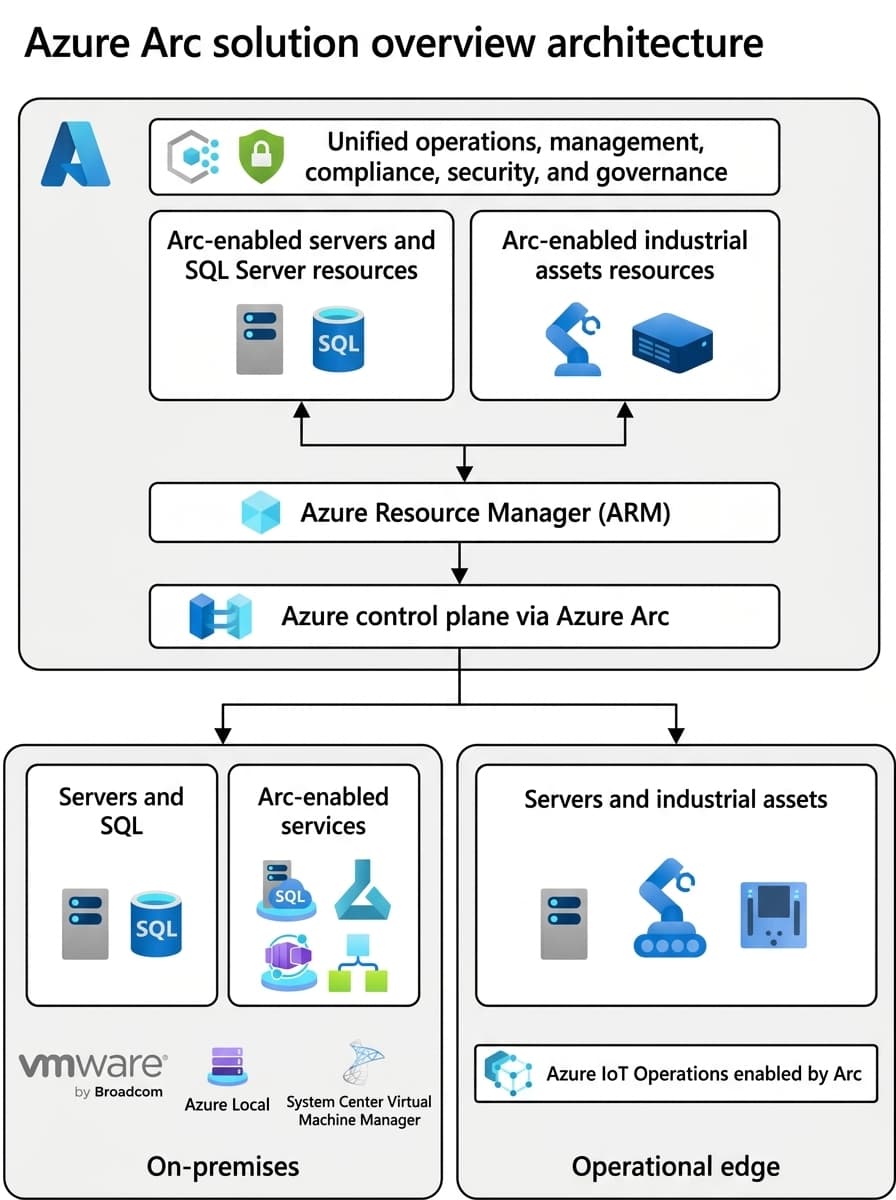
Onboarding servers into Arc is done by installing a lightweight agent. For larger environments like Model Group with dozens of sites across Europe, the agent is deployed in bulk via Group Policy or scripts.
After onboarding, Azure Policies are applied automatically: Defender is deployed to all servers with a single policy, logs start flowing into a central Log Analytics workspace, and servers are assigned to patching waves based on their tags.
One thing that surprises people: onboarding reveals a state that was previously invisible. Linux servers with non-standard configurations, machines without up-to-date agents, systems with no coverage.
That is exactly why we recommend planning for a clean-up phase after onboarding. It is not a complication. It is value.
Examples of queries the IT team could run for the first time after implementation:
“List servers by number of critical log errors in the past week.” / “Show servers trending towards running out of disk space next month.”
Every tool in the environment costs more than just its licence. It costs time for management, integration, training and maintenance. And for an environment of around 500 VMs and 30 hypervisors, those costs add up fast. Without Azure Arc, Model Group would have needed System Center for the Windows side, a separate Linux management tool and another layer for centralised logging. TCO without Azure Arc falls between approximately €601,000 and €891,000 over 5 years. With Azure Arc and Software Assurance, that cost drops to approximately €197,000 over 5 years. Average saving: over €9,000 per month.
What makes up the saving?
With Azure Arc there are no costs for a separate Linux management tool (€65–130k / 5 years) or a log management stack (€43–87k / 5 years). The Windows side is covered by Software Assurance with no extra charge for Arc.
Previously, Windows Server logs were stored locally or forwarded via WEF; Linux logs locally or via Syslog forwarding. Every incident meant manually switching between systems and a lengthy search for the root cause. After deploying Azure Arc, data from on-premises servers began flowing into the same central Log Analytics workspace. For the first time in one place — Windows, Linux, Azure, containers. Retention up to 2 years. Logs also serve as the foundation for automations via Logic Apps and Azure Functions.
What does this mean when handling an incident?
"Which process had a problem connecting to the CRL certificate validation?" Instead of switching between tools — one query, and the answer applies to the entire environment at once.
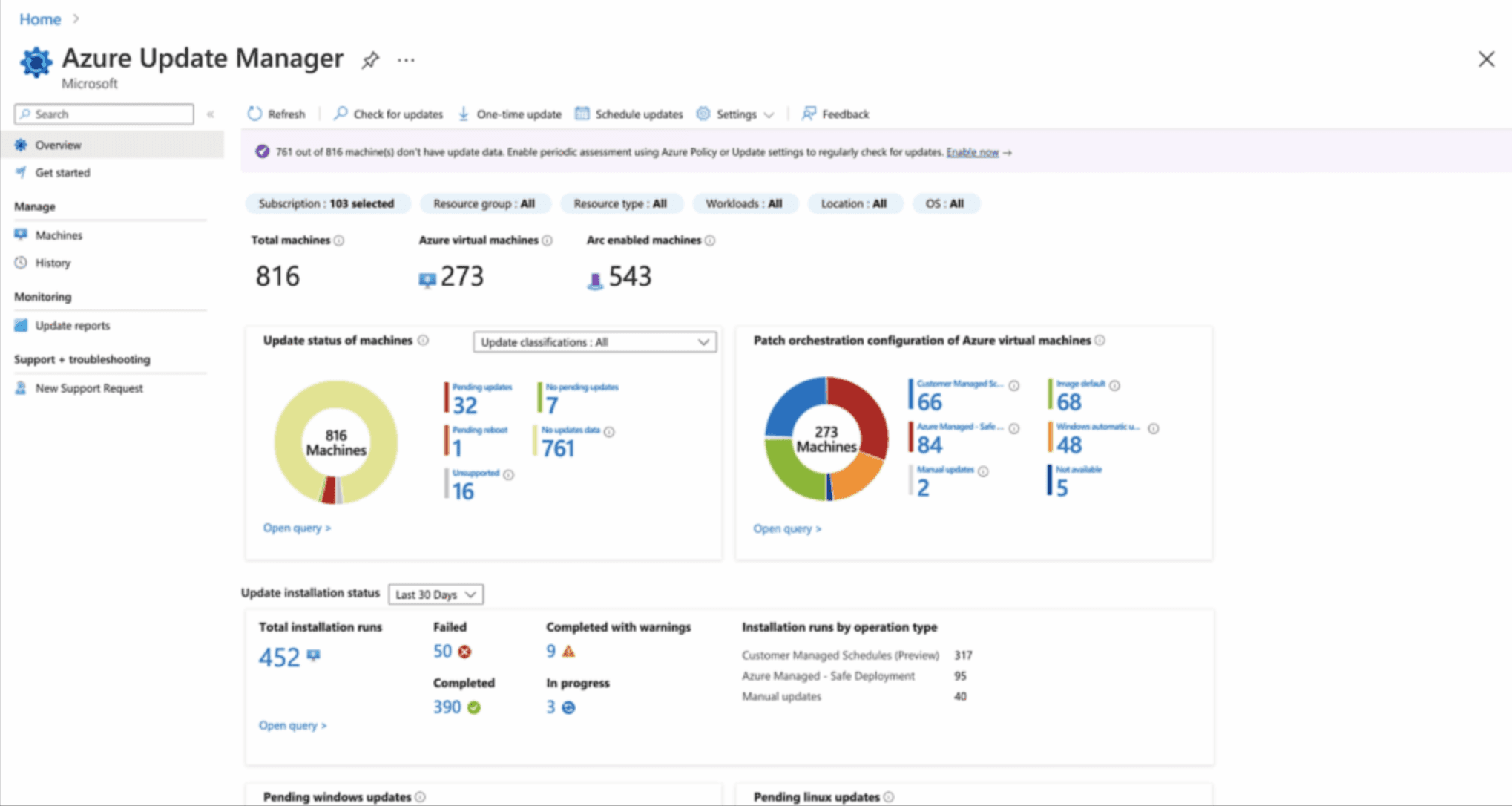
The starting point: WSUS covered only Windows — and only some of them. Linux was patched manually, or not at all. Nobody knew what percentage of the environment was actually up to date. After deploying Azure Arc and Azure Update Manager, Model Group gained a unified view of the update status across 100% of servers. Using tags, servers were assigned to maintenance windows — production, testing, offices. Patching runs automatically in the defined order. For complex dependency scenarios — such as SAP servers — orchestration was set up using Logic Apps and Azure Automation.
Tip from practice
Patching is boring — and that is a good thing. If your patching is dramatic, something is going wrong. The goal is to do it so regularly and automatically that nobody thinks about it.
Some production systems were running on Windows Server 2012 R2 — a version for which Microsoft ended extended support. A full migration before the deadline was not realistic. The solution: Extended Security Updates activated directly for Arc-managed servers, on a pay-as-you-go basis — the same approach applies to SQL Server. Model Group pays only for the machines that actually need ESU. As migration progresses, licences are released. No compliance gap, no crisis project.
Model Group needed a Microsoft SQL audit across the entire environment — for licensing and planned consolidation purposes. Typically this is a lengthy manual process: someone goes around the servers, collects data, assembles spreadsheets. Azure Arc had the SQL extension. The auditor logged in and immediately saw a current overview of the entire group SQL environment:
No extra preparation. Arc was already deployed — the data was simply there.
"We get an overview of where SQL actually runs, at what scale and in what state — not just where we think it runs."
Díky Entercloudu a nasazení Azure Arc se nám podařilo výrazně zrychlit reakční dobu a řešení kritických incidentů v celé naší infrastruktuře. Současně jsme získali plnou kontrolu nad procesem aktualizací, což zásadně zvýšilo bezpečnost a stabilitu našich systémů.
Pavel Soukup
Head of Infrastructure and Operations, Model Group
We did not act as an external vendor who comes in, deploys and leaves. We set up ESU licensing so that Model Group only pays for what it genuinely needs, and stops paying as soon as systems are migrated.
The entire solution was handed over to the internal team with the goal of knowledge transfer, not dependency.
* Tooling savings are based on a modelled TCO calculation for the Model Group environment (30 hypervisors, ~500 VMs). Other metrics are based on project documentation.
We have seen this at dozens of companies. In a first 30-minute call with an expert you will find out whether Azure Arc is the right solution for you.